Template modifications
After completing your template in the editor, you're ready to automate it by replacing the placeholder with actual data. This is done using "modifications"; instructions that specify which changes to apply to your template before generating the final video or image.
Modifications are structured as a key-value object, where the key refers to the RenderScript property you want to replace, and the value is what you want to replace it with. This approach allows you to edit any attribute within the template without working directly with RenderScript – maintaining separation between design and automation. In an API request, the object goes in the modifications field of a render, next to the ID of the template it applies to..
Replacing a property
If your template has a text element named Main-Title and you want to change the color of the text, you can do so using the modification "Main-Title.fill_color". This combines the element name (Main-Title) with the property name (fill_color), connected by a dot.
You can also omit the property name and simply refer to Main-Title. This defaults to using the element's main property. For text elements, the main property is text, and for elements that expect a file, the main property is source (pointing to a URL):
curl -X POST https://api.creatomate.com/v2/renders \
-H "Content-Type: application/json" \
-H "Authorization: Bearer YOUR_API_KEY_HERE" \
-d '{
"template_id": "YOUR_TEMPLATE_ID_HERE",
"modifications": {
"Main-Title.fill_color": "#ff0000",
"Main-Title.text": "This is the replacement text for the Main-Title element",
"Main-Title": "This simplified syntax achieves the same result as the line above",
"Background-Image": "https://cdn.creatomate.com/demo/image1.jpg"
}
}'Changing template settings
You can also modify template-level properties that aren't associated with specific elements. For example, to override the template's default dimensions, you can specify new width and height values:
curl -X POST https://api.creatomate.com/v2/renders \
     -H "Content-Type: application/json" \
     -H "Authorization: Bearer YOUR_API_KEY_HERE" \
     -d '{
  "template_id": "YOUR_TEMPLATE_ID_HERE",
  "modifications": {
    "width": 1920,
    "height": 1080
  }
}'
Available properties
You can mark specific properties as "dynamic" in the template editor, signifying that the property is meant to be replaced. This isn't a requirement, but helps you organize your template by indicating which parts are placeholders.
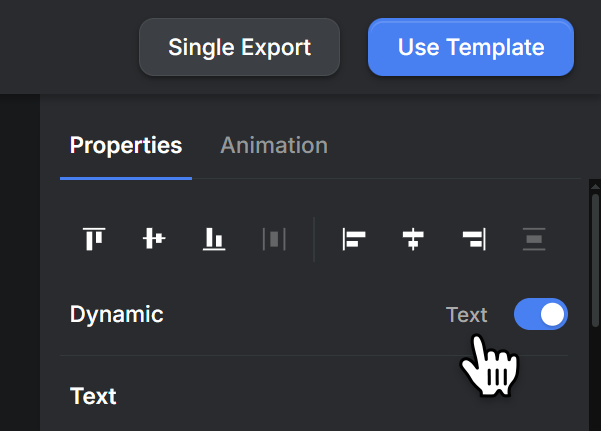
To make a property dynamic, use the Dynamic row at the top of the properties panel. Once marked as dynamic, Creatomate suggests the corresponding modifications when you click Use Template at the top right of the editor, and then Developer API.
API examples
Modifications are a powerful feature that go much further than simply replacing properties – they enable you to insert, delete, and even dynamically add new video scenes. The API documentation provides examples of how to make complex edits to a template.